
Download Buzz Cut Filter – Free AI Hairstyle Preview, Secure & Easy
Introduction & Overview
In today’s visual‑driven world, experimenting with a new haircut without the commitment is a common wish. Buzz Cut Filter answers that wish by providing an AI‑powered, browser‑based tool that instantly shows you how you’d look with a buzz cut. The service runs entirely in your web browser, meaning the photos you upload never leave your device.
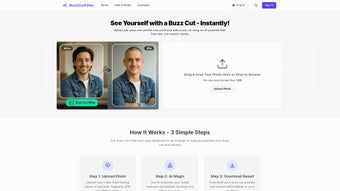
This local‑processing model safeguards personal data and eliminates any risk of unwanted cloud storage. Users simply select a clear, front‑facing portrait in JPEG or PNG format, and the application’s facial‑recognition engine maps facial landmarks, hair colour, and skin tone to generate a realistic buzz‑cut overlay. The result is a high‑resolution image that can be downloaded, saved, or shared directly to social media platforms.
While the core functionality is completely free, a premium credit system is available for those who need higher‑resolution exports, faster rendering, or access to additional style variants. The interface is fully responsive, adapting to desktops, tablets, and smartphones, so you can try the tool at home or on the go. Whether you’re a teenager eager to experiment, a professional considering a bold new look, or a barber needing a quick client mock‑up, Buzz Cut Filter blends speed, privacy, and cutting‑edge AI to deliver a trustworthy, enjoyable experience.
Core Features of Buzz Cut Filter
- AI‑Powered Facial Recognition for Precise Hairline Mapping
- Instant Real‑Time Buzz‑Cut Preview in Seconds
- Supports JPEG and PNG Image Formats
- Local Image Processing – No Upload to External Servers
- Mobile‑Responsive Design for Phones, Tablets, and PCs
- Free Basic Version with No Subscription Required
- Premium Credits for High‑Resolution Downloads & Faster Rendering
- One‑Click Download of the Generated Image
- Secure HTTPS Connection to Protect Data Transfer
- Optional Cloud Backup for Registered Users
- Adjustable Buzz‑Cut Length Slider (Classic, Fade, and Custom)
- Direct Social Sharing Buttons for Instagram, Facebook, Twitter
Each of these features has been designed with the end‑user in mind. The AI engine analyzes up to 68 facial landmarks, ensuring the buzz‑cut overlay respects the natural contours of the head. Because processing occurs locally, the tool works even on slower internet connections after the initial page load. The free tier includes everything needed for a casual preview, while the premium credits unlock 4K‑ready exports and priority rendering queues, making the solution suitable for both hobbyists and professional stylists. The optional cloud backup lets registered users store their history securely, though no personal data is ever shared without explicit consent.
Installation, Usage Guide & Compatibility
Installation – No Download Required
Buzz Cut Filter is a web‑based application, so there is nothing to install. Simply open a modern browser—Chrome, Firefox, Safari, or Edge—and navigate to buzzcutfilter.com. The site detects your operating system automatically and serves an optimized version for Windows, macOS, Android, or iOS.
Step‑by‑Step Usage
- Open the website: Load the homepage over a secure HTTPS connection.
- Upload a photo: Click “Upload Photo” and select a clear, front‑facing portrait with natural lighting.
- AI analysis: Within 2‑5 seconds the engine maps your facial landmarks and applies a realistic buzz‑cut overlay.
- Adjust length (optional): Use the slider to switch between classic, fade, or custom lengths.
- Download or share: Click “Download” to save a PNG file or use built‑in icons to share on Instagram, Facebook, or Twitter.
- Upgrade if needed: Purchase premium credits for high‑resolution output or faster processing via a secure payment gateway.
Compatibility
The tool works on any device that supports HTML5 and JavaScript, including:
- Windows 10/11 – Chrome, Edge, Firefox
- macOS Monterey and later – Safari, Chrome, Firefox
- Android 9+ – Chrome, Firefox
- iOS 13+ – Safari, Chrome
Because all processing is performed locally, performance is consistent across platforms, and no additional plugins or extensions are required. Even on older hardware, the lightweight JavaScript engine ensures a smooth experience.
Pros, Cons & Frequently Asked Questions
Pros
- High privacy – images never leave the browser.
- Fast rendering – results appear in seconds.
- Generous free tier covers all essential functions.
- Intuitive UI requires no technical expertise.
- Cross‑platform compatibility on Windows, macOS, Android, and iOS.
- Adjustable length slider for customized looks.
- Direct social sharing saves time.
Cons
- Premium features require purchase of credits.
- No native desktop application – requires an internet browser.
- Limited to buzz‑cut styles; other hairstyles need separate tools.
- Image quality depends on the resolution of the source photo.
- Advanced customizations (e.g., beard integration) are not yet available.
Frequently Asked Questions
Is my photo stored on a server?
No. All image analysis happens locally in your browser, so the original photo never leaves your device.
Do I need to create an account to use the free version?
No account is required for the basic preview and download. An account is only needed if you want to purchase credits or save your history.
What image resolution is recommended?
A minimum of 800 × 800 pixels yields a clear preview. Higher resolutions improve the final download quality, especially for printing.
Can I use the tool on a slow internet connection?
Yes. Because the AI runs locally, only the initial page load needs an internet connection. After that, processing occurs offline.
Are there any hidden fees?
The basic preview and standard‑resolution download are completely free. Premium credits are optional and clearly priced before purchase.
Overall Rating: 4.5 out of 5 stars – The AI accuracy, privacy‑first design, and generous free tier make Buzz Cut Filter a standout tool for anyone curious about a buzz cut.
Conclusion & Call to Action
Buzz Cut Filter delivers exactly what its name promises: a fast, secure, and accurate way to preview a buzz cut before you commit. The AI’s attention to facial detail, combined with a privacy‑first approach that processes images locally, sets it apart from many competing apps that upload your photos to the cloud. The free tier is generous enough for casual users, while the optional credit system gives power users the ability to obtain high‑resolution files and faster rendering. Its cross‑platform compatibility ensures you can try the tool on a desktop at home or on a smartphone while you’re out shopping for a new look.
If you’re still on the fence, consider this: the tool costs nothing to start, respects your data, and produces an instantly shareable image. Even if you decide not to get the buzz cut, you’ll have a realistic visual reference that can help you discuss other styles with a barber or stylist. In short, Buzz Cut Filter is a practical, user‑friendly, and trustworthy solution for anyone curious about a bold haircut.
Ready to see the new you? Visit Buzz Cut Filter now, upload a photo, and get a free preview in seconds. Upgrade to premium credits only if you need that extra polish – otherwise, enjoy the free, secure experience today.



.png)



